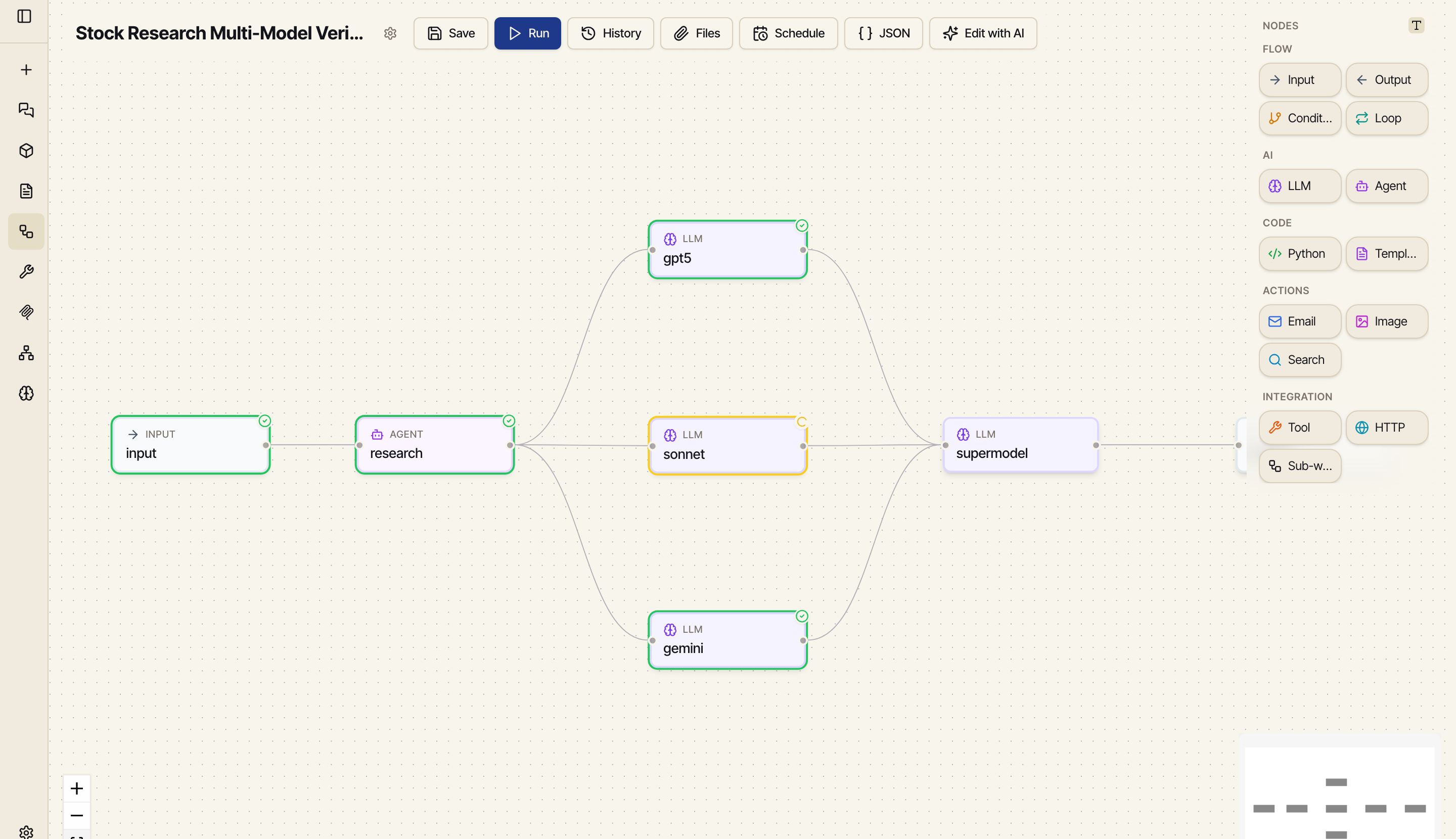
The actual editor — input → research → three models in parallel → synthesize → output. Drag to compose, or let the chat author it for you.
The best workflows are discovered, not designed. You go back and forth in chat — running code, searching the web, trying different models — until you get the answer you actually wanted. Then you say "save this and run it every morning." Catalyst turns that exact sequence into something it can repeat the same way every time. No diagrams, no setup — it just remembers what worked.
The actual editor — input → research → three models in parallel → synthesize → output. Drag to compose, or let the chat author it for you.
Ask, run a little code, search the web, switch models — whatever it takes. Keep tweaking until you get the answer you actually wanted. Chat is your scratch pad: fast, cheap, no commitment.
Just ask. Catalyst takes the steps that worked and writes them up as a workflow it can run again — automatically. There's nothing new to learn, and you never leave the chat.
you "save this as a workflow" ✓ workflow ready The workflow opens in a live editor right next to the chat. Run it as many times as you want before committing to anything. Adjust it by asking in plain language, or drag the steps around by hand.
Pick a time and your time zone. Have it email you the result — reports, spreadsheets, whatever it made — with the files attached. Catalyst runs it on schedule, even while you sleep.
A handful of pieces snap together. Most workflows use just four of them — but they combine into just about anything you can think of.
The values you feed in — like a list of stock tickers. Set defaults so it can just run on its own.
What the workflow hands back when it's done — the report, the answer, the file.
Pick a model, write the prompt. Swap to a different model anytime without rebuilding anything.
Run a snippet of code in a clean, private workspace. Anything it makes — a chart, a PDF — gets picked up automatically and passed along.
Stitch results together into a message or prompt. Misspell the name of an earlier step and it stops and tells you — instead of quietly sending something broken.
Send an email, search the web, generate an image, fetch a page — any of the tools Catalyst connects to.
Go one way or another depending on what happened. The two paths can rejoin later.
Run the same steps over a whole list — every ticker, every row — many at the same time.
Send data to another app or service. (To just read a web page, the fetch tool is easier.)
Drop a whole saved workflow in as a single step. Build big things out of smaller ones.
Plenty of tools quietly hide their mistakes and hand you a broken result anyway. Catalyst is built to fail out loud, stay tidy, and run the same way every time.
Misspell the name of an earlier step and it won't quietly send you an empty, broken result. It stops right there and tells you what went wrong — and what the correct names are.
If a step fails, everything that depended on it is skipped and shown in gray — instead of wasting your time and money running on bad data.
Every run gets its own private workspace, so runs never trip over each other. Any files it creates are saved automatically and passed straight to the next step.
Test a draft as many times as you like before committing to it. Every run still shows up in your history, so nothing gets lost.
Process every item — all your tickers, all your rows — at the same time instead of one by one. If a few fail, the rest still come through.
Use a saved workflow inside another one as a single step. Build big, reliable automations out of smaller pieces you already trust.
Pick when it should run and your time zone. Catalyst runs it on its own and emails you the result — as a nicely formatted message with any files attached. You'll see it land in your inbox; you don't have to be sitting there for it.
Watch each step finish in real time. When it's done, every step's inputs, results, and files are saved — so you can open any past run and see exactly what happened. No digging through logs, no guesswork.
The fastest path from "let me try something" to "this runs every Monday at 7am" is the one that never makes you switch tools.